• Guest, Help The DPF Community Thrive - Join Our Donation Drive Today!

    We're launching a special DPF Donation Drive to ensure our beloved forum continues to flourish. Your support is vital in helping us cover essential server costs and keep our community running smoothly — This is more than just a donation; it's an investment in the future of our community.

    Join us in this crucial drive and let's ensure our forum remains a vibrant and dynamic place for everyone.

    Please visit the DPF Donation Drive Thread for details and instructions on how you can make your donation today!
  • DPF Member Pins NOW AVAILABLE!
    Head on over to the Official Announcement to secure your pin today!

DPF Development HELP! Help us test the DPF "Public" Pin Trading Board!

DPF Development HELP! Help us test the DPF "Public" Pin Trading Board!
I just incorporated theme switching; it's at the very bottom, but the "light theme" palette isn't complete yet, so some elements may be hard to read with low contrast (at least when I was testing)

View attachment 21299

View attachment 21300
I guess it was actually minimal contrast in the dark theme that was straining my eyes. The grayish font on the black background was very hard to see.
 
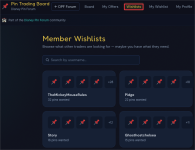
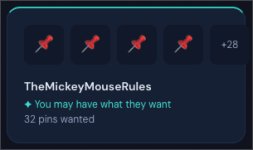
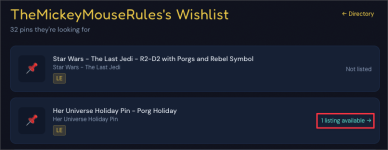
The ability to browse all wishlists has been added;

Click the "Wishlists" link at the top to view all wishlists — you can also search by username

View attachment 21301
This is beautiful! And I just got a message that a pin from my wishlist has been added to the trade board. How cool!!! Thanks!
 
I love the ease so far of searching using PinandPop and adding to the wishlist as well as the trade boards. The notation area also is a great way to give any needed specific notes on the pins being offered. And I love the way notifications keep me up to date as to board activities of what’s available as well as offers. I’ve not come across any glitches on my end of exploring so far 🥰
 
Am I the only person who has to strain to see the grey text here?
ad758b50d469514ec941947dc4732c6a.jpg


Sent from my iPhone using Tapatalk
 

Trade offer acceptance has been enhanced:


When sending an offer...

You can select specific pins from the trade listing that you want in exchange:
1774894603727.png

On the receiving end of an offer...

You can now select which pins you want from the offer, as well as which pins you are giving up in the trade:

This is how it looks on the listing page...
1774894443786.png

And is also available (with some extra detail) in your "My Offers" page:
1774894795873.png


please test this functionality in your simulated trades! Thanks for everyone's input and testing!
 
Thank you, yes.

So the is number is for Each Pin, not My Personal P&P User ID # that gives direct Access to All my traders? That is what I was thinking.
there's currently no way to manage an inventory in here; all Pin & Pop ID's need to be entered manually for your wishlist, or when you initiate a trade.
 

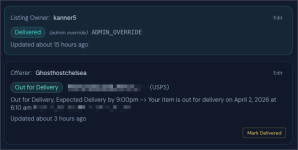
Added shipping/tracking functionality for accepted trades​

When you accept a trade, it moves into "PENDING" status, and you are able to enter your tracking numbers:

1774898535188.png

Tracking numbers are only viewable by the involved parties:

1774897841999.png

When tracking numbers have been entered by both involved parties, the trade is no longer able to be cancelled:
1774898676067.png
 
Initial Reaction: Intuitive. Easy to Use. No real "how to" guide needed.
Suggestions for future versions: 1,. To be able to delete a submitted trade, without having to accept the blank trade. I posted the wrong pin and realize now that I could have just added a pin and deleted the other, but in the moment, I was looking for a delete option. 2. When putting in pins that you would like in trade, to be able to select them from your wishlist. Having to once again enter the P&P pin number seemed repetitive.
Overall, a great start! I am looking forward to using it!
 
Initial Reaction: Intuitive. Easy to Use. No real "how to" guide needed.
Suggestions for future versions: 1,. To be able to delete a submitted trade, without having to accept the blank trade. I posted the wrong pin and realize now that I could have just added a pin and deleted the other, but in the moment, I was looking for a delete option. 2. When putting in pins that you would like in trade, to be able to select them from your wishlist. Having to once again enter the P&P pin number seemed repetitive.
Overall, a great start! I am looking forward to using it!
Thanks for the feedback — all good points;

Maybe we can have it work to either enter P&P ID (so it remains open ended where you can add whatever you want, even if it’s not on your wishlist), but for ease of listing when you want specific pins in return (I.e. not an open trade where you take offers) , also be able to select entries from your wishlist.
 
Sounds awesome, I will take a look at this over the next couple of days!!
Please do, and I’m welcoming any and all feedback! This public cork board/trading board idea has been swirling around for a while, but haven’t had much time to execute.

I’m hoping to build a different type of experience for us compared to what already exists, and hopefully you all like it! All the members here are probably all the “hardcore” or “purist” pin traders, so being able to draw on everyone’s experience and ideas to build it out is really valuable.

A big THANK YOU to everyone who’s already begun poking around and providing feedback!
 
Initial Reaction: Intuitive. Easy to Use. No real "how to" guide needed.
Suggestions for future versions: 1,. To be able to delete a submitted trade, without having to accept the blank trade. I posted the wrong pin and realize now that I could have just added a pin and deleted the other, but in the moment, I was looking for a delete option. 2. When putting in pins that you would like in trade, to be able to select them from your wishlist. Having to once again enter the P&P pin number seemed repetitive.
Overall, a great start! I am looking forward to using it!

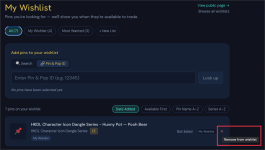
Pins can now be added from your wishlist​


When creating a new trade listing, you can now add pins from your wishlist under the "Pins I'm Looking for" section during listing creation.

  • A dropdown pops up and will add them to your list (bottom section) as you select them.
  • Simply click the "X" to remove it from your "wanted" section.
  • This functionality is also supported when you edit your listing(s)

1774933383758.png
 

Implemented user profiles:

1774940927184.png

1774940955773.png

Optimized mobile experience:

instead of links crowding the top bar if viewed on a phone, they're moved to the bottom with icons when viewed on a mobile device:
IMG_2509.jpeg
 
Last edited:
The contrast is much improved in the dark theme, although I still don't think I could look at it for very long. The light theme has some font that completely disappears (at least for me).

And boy would it be nice to be able to attach a photo without going to tapatalk. I'll be back.
 
I absolutely love the wishlists! It would be even better if I could easily find a user’s trades to consider offering their wished for pin on something they have listed.

I have these pins and want to know if they have something I would like to offer on. Maybe the profile link is there and I just can’t find it?

11661f8a9863798ff7b9ab0b5b44f98e.jpg


Sent from my iPhone using Tapatalk
 
Back
Top